Smart Display Buying Guide for Practical Everyday Home Control
Smart displays often look like a natural upgrade from smart speakers, but they solve a slightly different household problem. The screen adds visual context for timers, weather, camera views, video calls, recipes, calendars, and smart-home dashboards, yet it also changes where the device fits and what the household expects from it. A display that feels useful in a kitchen may feel oversized on a nightstand. A screen that looks impressive on a product page may add surprisingly little value if the room already has better ways to view information. The best smart display usually succeeds not because it does everything, but because it reduces friction in one or two rooms where spoken control and visual confirmation genuinely belong together. This guide focuses on those practical tradeoffs so you can choose a smart display that fits the room, the household routine, and the level of visual smart-home control you will actually use over time.
Start with the room and decide what the screen should actually do there
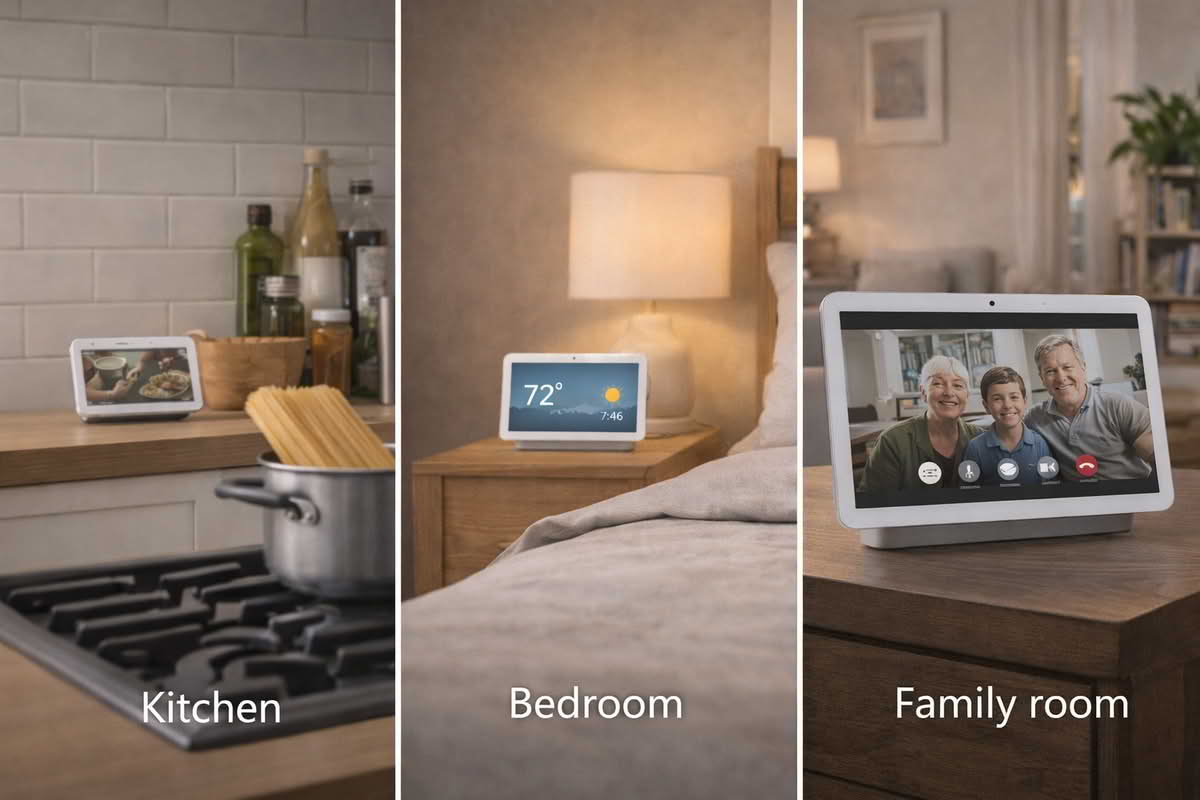
The most practical smart display purchase begins with a room, not a device category. A kitchen counter display, a bedside display, a family-room display, and a small office display each create different expectations. Some rooms benefit from quick glances at timers, calendar items, and weather. Others benefit from camera views, recipe guidance, or a more visible smart-home control surface. The mistake many buyers make is assuming that adding a screen automatically makes a smart assistant more useful everywhere.
In kitchens, smart displays often make the strongest case because the room already rewards hands-free interaction plus occasional visual reference. Timers, shopping reminders, music control, casual video, recipes, and quick camera checks can all make sense there. The kitchen is also a room where people are often moving, multitasking, and not interested in pulling out a phone with wet or messy hands. That makes the combination of voice and glanceable information unusually practical.
Bedrooms and bedside tables create a different use case. Here, a display may be more about alarms, weather, gentle routines, short voice requests, and perhaps a quick morning schedule check. In those spaces, larger screens are not always better. A compact display can feel appropriate and calm, while an oversized model can become visually dominant in a room that should stay quieter and less screen-driven. This is one reason buyers should think carefully before assuming the biggest display gives the best value.
Family rooms and common areas create yet another decision. A larger screen may be useful for household dashboards, camera views, shared calendars, and casual media, but it also has to justify its physical presence. If the room already includes a television, tablets, phones, and other ways to access information, the display needs a clear reason to exist there. Otherwise it risks becoming a second-rate screen rather than a meaningful household tool.
Choose the display size based on the room’s visual needs, not just on what seems impressive in a product listing.
Use kitchen placements when timers, recipes, and glanceable household information matter daily.
Use smaller bedside or desk displays when calm voice access and compact visual support are the priority.
Question whether a larger shared-room display adds real value if the room already has better screens nearby.
Placement discipline matters more than buyers often expect. A kitchen display tucked too low, blocked by appliances, or exposed to splashes may be less useful than a smaller unit placed thoughtfully. A bedside display positioned awkwardly can become too bright, too close, or too visually distracting. In common areas, the viewing angle and how often people actually glance at the screen matter more than the product’s stated role. Smart displays succeed when they fit naturally into lines of sight and room movement.
Another quiet factor is who the display is really for. A personal office display can be bought for one person’s routine. A kitchen or family-room display needs to make sense to multiple people with different habits. That changes the standard. The device should be understandable and casually useful to the household, not just to the person who set it up. The more shared the room, the more important it becomes that the display feels intuitive rather than overly customized.
Smart displays provide the most value when screen size and placement match the room’s actual routines instead of assuming every room needs the same kind of visual assistant.
A helpful way to evaluate room fit is to ask what visual task the device should solve that a speaker alone cannot. If the answer is weak or vague, a smart speaker may be the better choice. If the answer is clear, such as timers, camera checks, recipe guidance, or a more visible control dashboard, then the display starts to justify itself in a practical way.
The safest starting mindset is to treat the display as a room-specific visual control tool, not simply as a smarter speaker. Once you know what the screen should do, the rest of the buying decision becomes much more grounded.
Choose a display based on visual control needs, not just voice-assistant familiarity
Smart displays are often purchased by people who already know they want a particular voice assistant, but voice familiarity should not replace thinking through visual use. The screen changes the device’s role. A display can act as a control panel, a camera viewer, a household info hub, or a light media device depending on the room. Buyers sometimes focus too much on assistant branding and not enough on whether the screen actually improves control in a meaningful way.
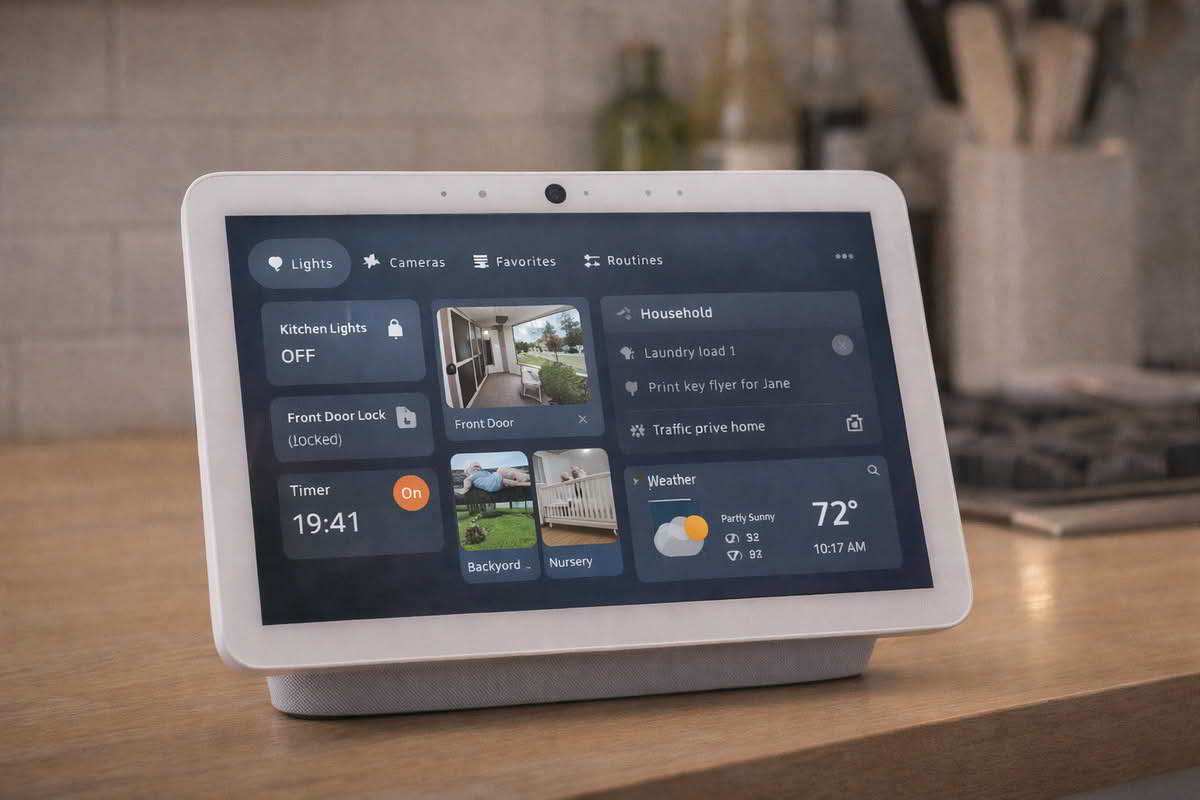
One of the strongest reasons to buy a display is smart-home visibility. When lights, cameras, plugs, thermostats, doorbells, or routines are part of the household, a screen can provide faster visual confirmation than voice alone. That can be especially useful in kitchens, mudrooms, family rooms, or other shared spaces where a quick glance is often easier than opening a phone app. But this benefit depends heavily on how well the display presents those controls. If the dashboard feels shallow, cluttered, or awkward, the screen may add less value than expected.
Camera use is another major driver in this category. A display can be helpful for checking a front door, nursery camera, driveway feed, or other household views without reaching for a phone. But that only matters if visual monitoring is something the household genuinely wants to do from that room. In some homes, a kitchen display that can show the front porch or back door briefly is very useful. In others, the feature sounds good in theory but is rarely used in practice.
Video and media capabilities deserve a similarly grounded view. Some buyers want the screen mainly for music lyrics, short clips, recipe walk-throughs, or casual video while cooking. Others imagine a display as a major media device when the room already contains a better screen. The key is to treat the display as a supplemental visual surface, not as a substitute for every other screen in the home. It usually provides the most value through quick utility tasks rather than extended screen time.
Choose a smart display when visual confirmation or dashboard access adds something voice control alone cannot provide.
Value strong smart-home dashboards if the display is meant to control or check multiple devices regularly.
Use camera viewing as a buying factor only when that room truly needs quick visual access to the feed.
Do not overvalue casual video features if the room already has a better screen for longer viewing.
This is also where ecosystem fit becomes more important than many buyers expect. A display often becomes the most visible interface for a broader smart-home platform, which means room control logic, dashboard layout, camera compatibility, and multi-device coordination matter more than they would with a speaker alone. A platform that feels fine through voice commands may feel less impressive once you actually ask it to serve as a visual control center.
Larger displays can make more sense when visual navigation is central to the room. A kitchen household hub, a common-area dashboard, or a wall-adjacent control station may justify more screen real estate. Smaller displays make more sense where the visual component is occasional rather than central. This is why “bigger is better” is rarely the right rule. The better question is whether the screen size matches the depth of visual interaction the room will support daily.
Smart displays are most useful when the screen adds quick visual control and confirmation that would otherwise require pulling out a phone or opening multiple apps.
A subtle failure mode in this category is buying a display mainly because it seems like the “next step” after a smart speaker. Sometimes it is. Other times, the speaker already handles the household’s real needs, and the screen mostly adds visual clutter. The display should earn its place by improving a few repeated routines, not by serving as a symbolic upgrade.
The better buying mindset is to ask what information or controls need to be seen, not just spoken. If that answer is strong, a smart display can make sense. If that answer remains vague, a speaker or another simpler device may be the better fit.
Judge smart displays by daily room usefulness, not by feature abundance alone
Smart displays are easy to enjoy during setup because they showcase many features at once. The harder question is what remains valuable after a few weeks. This is where the category becomes more practical. A good display should simplify repeated room tasks. If it does not, it becomes another screen in the house competing for attention without offering enough unique value.
Timers, calendar checks, routine prompts, music controls, weather, quick camera views, and smart-home dashboard access are often the features that survive long-term use. They may sound modest compared with the full product pitch, but they are usually what justify the device. A kitchen display that handles timers, shopping notes, and a front-door glance well may provide more real value than a larger model chosen for features no one uses after the first month.
Visibility and brightness behavior matter too. A display needs to remain readable without becoming visually intrusive. In bedrooms, that often means calmer nighttime behavior and a less dominant physical footprint. In kitchens, it means a screen that is easy to glance at from across a counter without taking over valuable space. In family rooms, it means the display should contribute something distinct enough that it is not just a lesser screen sitting near a better one.
Touch interaction should also be judged realistically. Buyers sometimes imagine they will use the display like a small household tablet, but in practice many smart displays are most effective when touch is occasional rather than constant. The strength of the product is usually the blend of voice plus visual context, not prolonged hands-on navigation. If the screen only feels useful when someone is poking through menus frequently, it may not be fitting the room naturally.
Prioritize the room tasks you expect to repeat daily, such as timers, dashboards, camera checks, or morning routines.
Choose displays that remain visually comfortable in the room instead of dominating the space.
Value quick glanceable usefulness over the idea of treating the display like a full-purpose tablet.
Judge long-term value by whether the screen reduces friction in the room after the novelty fades.
Shared household use matters even more with displays than with speakers because the screen makes the device a visible part of the room. A display in a common space should be easy for more than one person to interpret and use casually. If the dashboard is confusing, the routines are too personalized, or the screen surface becomes cluttered, the display may start serving only one person’s setup instead of the household’s needs.
Privacy and comfort deserve thoughtful attention too. A screen with a camera in a kitchen or common area may feel perfectly acceptable to one household and unnecessary to another. In bedrooms and workspaces, those considerations may matter more. The point is not that one answer is universally right, but that long-term comfort with the display’s presence is part of its usefulness. A device that makes the room feel uneasy will rarely become a beloved household tool.
Expansion potential is another quiet factor. If the display is the first one in the home and it works well, will the household want a second in another room? If so, the app logic, dashboard consistency, and room grouping should feel coherent enough to support that. A smart display is often the beginning of a room-based control pattern, not just an isolated screen purchase.
The lowest-regret buying mindset is to choose the smallest and simplest display that fully supports the room’s repeated visual tasks. In some rooms, that means a compact kitchen or bedside unit. In others, especially where dashboard visibility is central, a larger screen may be justified. Either way, daily usefulness matters more than theoretical feature depth.
Final Recommendations — choosing a display that earns its place in the room
The right smart display is usually the one that solves a clear room-level need for visual control or information without becoming just another unnecessary screen. Start by deciding what the display should help you see or manage in that specific room, then choose the size and platform that support those tasks with the least friction.
Choose compact smart displays when the room needs alarms, timers, short visual answers, or light smart-home control without a large screen footprint.
Choose kitchen smart displays when recipes, timers, camera checks, and household dashboard tasks are part of daily routine.
Choose larger displays only when the room truly benefits from more visible smart-home dashboards or shared visual access.
Prioritize room fit, dashboard usefulness, and repeatable everyday tasks over feature-heavy models that add more screen than value.
In the long run, the best smart display is the one that quietly supports the room’s routine and makes household information easier to access at a glance. It should feel like a useful control surface, not just a speaker with a screen or another device competing for attention in a room that did not really need it.