Wireless Home Security System Buying Guide for Practical Whole-Home Protection
Wireless home security systems promise a clean answer to a messy problem: how to make a home feel more aware without turning it into a complicated technical project. The problem is that many buyers approach these systems as if they were just camera bundles, when the real decision is broader. A true home security system combines sensors, alerts, entry protection, and sometimes cameras into one routine that needs to work consistently when people are home, asleep, away for the day, or traveling. A setup that sounds comprehensive in marketing can still become frustrating if it is annoying to arm, too noisy with alerts, weak at the actual entry points, or difficult to expand once the household’s needs change. The best system is usually not the one with the most devices in the box. It is the one that fits the home’s layout, the people living in it, and the amount of maintenance and monitoring they are realistically willing to manage over time.
Decide whether you need a true security system or just a few connected devices
Many households start shopping for a wireless home security system when what they really want is reassurance. They may want to know whether a door opened while they were away, whether the house is secure at night, or whether a package area and main entry can be checked remotely. The mistake is assuming that all of those needs automatically point toward a full system purchase. In practice, the first question is whether you need coordinated security behavior across the home or whether you simply need visibility at a few locations.
A true home security system is designed around states and responses. It helps you know whether doors or windows were opened, whether motion was detected in a protected zone, whether a siren should sound, whether the system is armed, and sometimes whether professional monitoring or emergency escalation is involved. Cameras may be part of that picture, but they are not the whole picture. If your main concern is seeing the driveway and front porch, a few well-chosen cameras may solve the problem more directly than a full security kit.
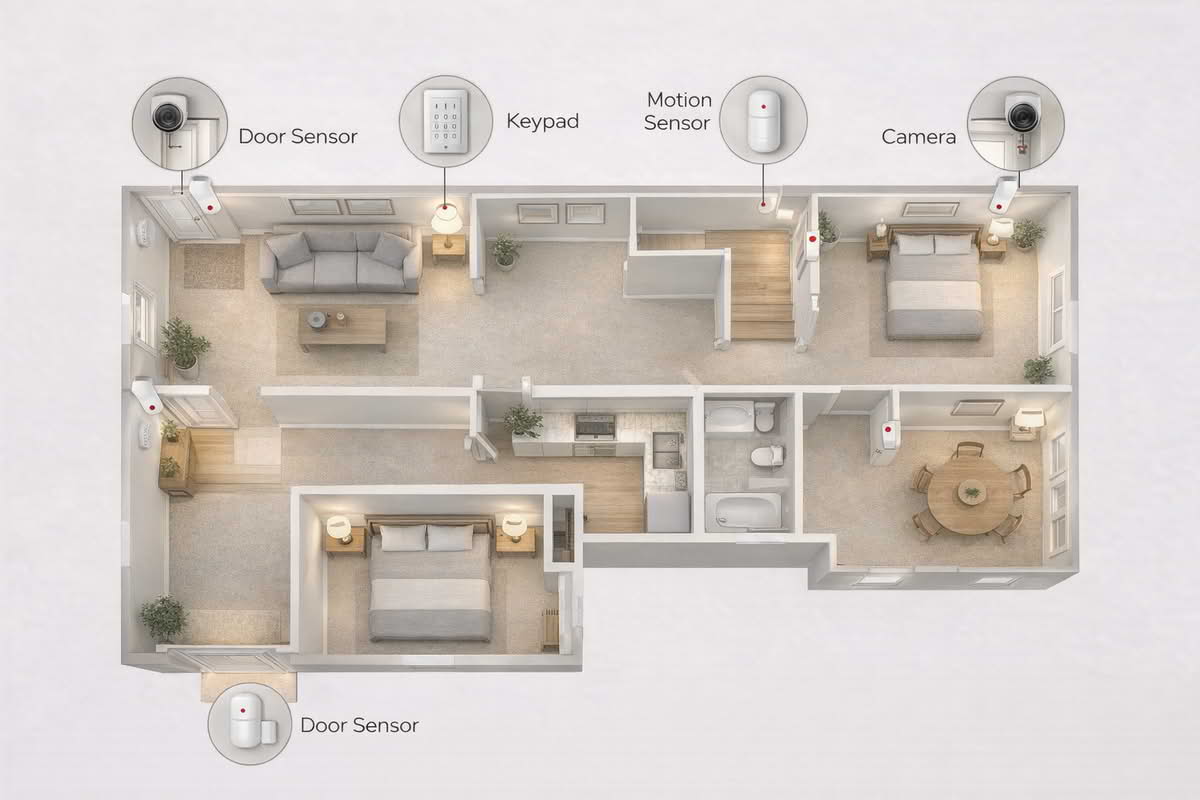
On the other hand, if your concern is broader household protection, especially around entry points and overnight peace of mind, a system approach usually makes more sense. Door and window sensors are often more useful than buyers first realize because they create simple, low-friction awareness at the points where access actually happens. Motion sensors help add an interior layer, but they should not be treated as a replacement for thinking carefully about how a person would enter the home in the first place.
This is where buyer psychology can lead to poor decisions. People are often drawn to starter kits with the longest feature list or the highest device count because it feels safer to buy “more” security. But a box filled with extra pieces is not automatically better if those pieces do not match the home’s real vulnerabilities. A smaller system that covers the front door, rear entry, a few ground-floor windows, and one well-placed interior motion area will often be more coherent and easier to use than a larger bundle that scatters equipment without a clear plan.
Choose a full wireless security system when you need coordinated entry protection and armed-state awareness.
Choose individual smart devices when your goal is mainly remote visibility rather than whole-home security logic.
Prioritize doors, accessible windows, and actual access paths before adding extra accessories.
Do not assume a larger starter kit is automatically a better fit for your home.
Home type also matters. A small apartment, a townhouse with one main entry, a single-story suburban home, and a larger two-story house all create very different security needs. A renter may value non-invasive installation and easy removal above all else. A homeowner may care more about layered coverage and future expansion. If you live in a compact space with one primary entry and limited exterior exposure, a lean system may be enough. If you have multiple ground-level doors, attached garage access, and a backyard gate path, you will benefit from thinking more systematically about layers.
The most practical framing is to ask what you want the system to tell you and when. Do you want confirmation that the house is secure at bedtime? Do you want a clear alert when an entry point opens while no one is home? Do you want cameras to support sensor-based alerts, or do you mainly want sensor-based confidence with optional video? Those questions define the system’s role far better than marketing phrases about smart living or advanced protection.
A practical wireless home security system starts with real entry points and interior movement paths, not with the largest bundle or the most accessories.
Match sensors, layout, and installation style to the home you actually have
Once you know you want a system rather than a few standalone devices, the next step is mapping the home realistically. Wireless systems are appealing because they reduce invasive installation and make it easier to add protection without running new wiring. But “easy installation” does not mean “no planning required.” The usefulness of the system depends on whether the right devices end up in the right places.
Entry sensors are usually the foundation. These devices are simple, but that simplicity is exactly why they work so well. They give direct information at the moment an exterior door or accessible window is opened. For many households, that is more valuable than relying heavily on interior motion detection, which tells you about movement after someone is already inside. If your goal is low-regret protection, think first in terms of edges: front door, rear door, side door, garage access door, first-floor windows, and any unusual access point that someone could reach without much effort.
Motion sensors still matter, but placement discipline is important. They work best in transition areas where movement would be meaningful, such as a main hallway, staircase path, or large open room that connects several zones. They work less well when placed casually in busy family spaces where normal activity, pets, or everyday routines create unnecessary complications. A poorly placed motion sensor can make the system feel noisy and inconvenient, which often leads to people leaving it disarmed more often than they intended.
Cameras inside a wireless security system should be treated as supporting layers, not automatic defaults for every room. Some households prefer a sensor-first system with minimal indoor video for privacy reasons. Others want exterior cameras integrated with alarm behavior so they can confirm what triggered an event. There is no universal answer, but the right approach depends on what kind of reassurance you want. If the system is primarily about knowing whether the home was entered, sensors deserve priority. If visual confirmation is central to your comfort, camera integration becomes more important, especially around entries and outdoor access zones.
Start with door and window coverage before adding less essential accessories.
Use motion sensors in meaningful transition areas, not just wherever mounting is easiest.
Let privacy expectations shape how much indoor camera coverage you truly want.
Think in layers: perimeter awareness first, then interior confirmation, then visual context where helpful.
Installation style deserves more attention than many buyers give it. Wireless systems often rely on adhesive mounts, compact hubs, battery-powered sensors, and app-based setup. That makes them attractive for renters and for homeowners who want a clean weekend project rather than a contractor job. But easy installation can also hide long-term questions. Will adhesive mounting hold up in hot entryways or on textured surfaces? Are battery replacements manageable across all sensors? Is the keypad in a location that feels natural when leaving and returning home? These details shape whether the system becomes part of the household routine or an awkward add-on.
Keypad or arming method matters more than it first appears. A system that is technically strong but annoying to arm will gradually be used less consistently. For example, if the app is the only convenient control point, some household members may find it slower or less intuitive than a physical keypad near the main exit. If several people use the system, ease of arming and disarming should be treated as a central buying factor, not an afterthought.
Households with pets also need to be realistic about motion-based coverage. Pet-friendly motion detection can help, but it does not remove the need for sensible placement. A large dog, a cat that jumps onto furniture, or a small pet with unpredictable movement patterns can all influence how useful interior sensing feels. If the home is active during the day and only lightly armed at night, your sensor priorities may differ from a quieter household with predictable schedules.
The best installation plan usually looks modest on paper: protect the actual access points, place one or two interior devices where movement means something, and add cameras only where they support a clear purpose. That restrained approach often feels better long term than treating every wall and doorway as a possible mount point.
Think through monitoring, alerts, and future expansion before you buy
One of the biggest differences between wireless security systems is not the hardware in the starter kit. It is what happens after setup. Monitoring options, alert behavior, app quality, and expandability determine whether the system remains valuable once the initial installation excitement fades.
Some households want self-monitoring only. They want alerts on their phones, a clear way to review events, and the ability to decide for themselves whether something needs attention. Others want the added structure of professional monitoring, whether for peace of mind during travel, overnight reassurance, or a more formal response path. Neither model is automatically superior. The better fit depends on how much responsibility you want to carry personally and how much you value outside escalation.
Subscription logic matters here. Buyers often focus on the upfront kit price and underestimate how much ongoing service choices shape total ownership cost. Monitoring plans, camera recording features, alert history, and cloud storage can all change the long-term equation. A lower-cost kit with a more demanding service model may be less appealing over time than a slightly more expensive system that gives you more control or a cleaner self-monitored experience. The practical question is not whether subscriptions are good or bad. It is whether the recurring value matches how you intend to use the system.
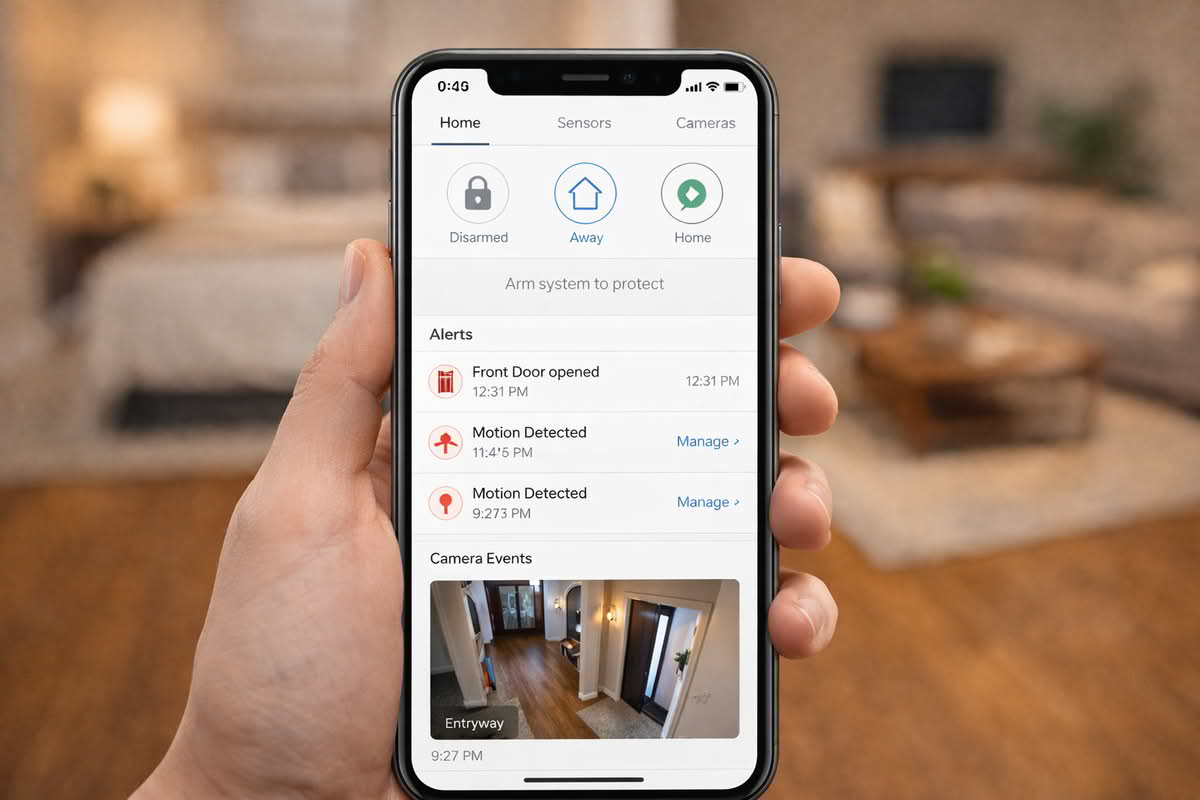
Alert behavior should be examined with equal care. A home security system should not feel like a constant stream of low-value interruptions. The best systems make it easy to distinguish routine events from urgent ones. Entry openings, armed-state changes, motion triggers, and camera events all need to feel understandable. If the app design is cluttered or the alerts are too broad, the household can become desensitized. When that happens, the system’s technical capabilities matter less because people stop trusting the signals.
Choose self-monitoring when you want direct control and can reliably respond to alerts yourself.
Choose professional monitoring when structured escalation is an important part of your peace of mind.
Treat subscription costs as part of the system design, not just a billing detail.
Prefer systems that make urgent events feel distinct from routine activity.
Expansion is another quiet source of buyer regret. Many people start with one door, a keypad, and a couple of sensors, then realize later that they want garage coverage, glass-break detection, outdoor cameras, leak sensors, smoke integration, or a second keypad. A system does not need to support every possible accessory to be a good choice, but it should not feel like a dead end either. The ability to grow in a controlled way matters because most households understand their real security needs better after living with the first version for a while.
This matters especially for renters and first-time buyers. Renter-friendly security kits often prioritize non-permanent installation and portability, which is genuinely useful. But if you expect to move into a larger space later, it helps to think about whether the same ecosystem can grow with you. Likewise, homeowners with a basic initial setup may later want to integrate exterior cameras or additional sensors once they identify the home’s blind spots. A flexible system reduces the chance that the first purchase has to be replaced completely.
Long-term satisfaction often depends more on alert clarity, arming routines, and room to expand than on the size of the original starter kit.
It also helps to think about daily modes of living rather than only imagining emergencies. How will the system work when people are home in the evening? What about overnight? What about when one family member is leaving and another is still inside? Can the household understand the difference between home, away, and night-style protection without confusion? Systems succeed when they fit these routine transitions cleanly. They fail when the rules are so awkward that people start bypassing them.
A good wireless home security system should feel calmer over time, not more demanding. It should create reliable awareness at the points that matter, provide usable alerts without constant noise, and leave room for thoughtful expansion if your needs change. That kind of system is rarely the most dramatic one. It is the one that matches the home’s layout, the household’s habits, and the level of complexity people are actually willing to live with.
Final Recommendations — choosing a system that fits real household routines
The best wireless home security system is usually the one that matches your entry points, your daily routines, and your tolerance for monitoring complexity. Start by deciding whether you need whole-home security logic or just a few connected devices, then build around doors, accessible windows, and meaningful movement paths rather than around whatever happens to be bundled in a starter kit.
Choose sensor-first systems when your main goal is clear entry protection and low-friction awareness.
Choose camera-inclusive systems when visual confirmation is important and the household is comfortable with that tradeoff.
Prioritize simple arming routines, clear alerts, and realistic expansion over oversized bundles with scattered accessories.
Match monitoring style, subscription tolerance, and installation needs to the people who will actually use the system every day.
In the long run, the lowest-regret system is the one the household keeps armed, understands easily, and can grow with as needs become clearer. A modest, well-planned wireless security setup will usually provide more lasting value than a more ambitious system that feels noisy, inconvenient, or overly complicated once ordinary life resumes.