Mesh Wi-Fi System Buying Guide for Practical Whole-Home Connectivity
Mesh Wi-Fi systems are often marketed as the clean answer to weak signal, buffering, and dead zones, but many buyers still end up disappointed because they buy for headline coverage instead of real household conditions. A larger house does not always need the biggest kit, and a small house can still have difficult network behavior if walls, layout, and device load are working against the signal. The more connected devices a home adds, the more frustrating weak networking becomes. Cameras drop offline, smart speakers hesitate, video calls stutter, and rooms at the edge of the house quietly become unreliable. A good mesh system should make connectivity feel more even and less fragile, not simply spread the same problems across more hardware. This guide focuses on those practical tradeoffs so you can choose a mesh setup that fits your floor plan, your internet habits, and the way a modern connected home actually behaves over time.
Start by deciding whether you truly need mesh instead of a better single router
The first mesh Wi-Fi decision is not which brand or speed tier to buy. It is whether a mesh system is actually the right solution for the problem in your home. Buyers often move toward mesh because it sounds like the modern default, but the better question is what kind of network frustration you are trying to fix. A single weak room at the far end of the home, a detached office, a two-story layout with signal drop upstairs, or a device-heavy household with uneven coverage all point in different directions.
Mesh systems make the most sense when the home has more than one meaningful weak zone or when the layout prevents one router from serving the whole space reliably. This is common in longer homes, multi-story homes, houses with dense interior walls, and homes where the internet connection enters at an awkward edge rather than near the center. In these situations, adding one stronger router may improve the main room but still leave important edges weak. Mesh earns its value when the real issue is distribution, not just raw router strength.
That distinction matters because some homes do not actually have a mesh problem. A small or mid-size apartment, condo, or compact single-story home may be better served by a stronger router in the right location. Buyers sometimes jump into a two- or three-node mesh kit only to discover the system feels excessive, harder to place cleanly, and not meaningfully better than a well-chosen router would have been. Mesh is not automatically the more advanced answer. It is the better answer only when the shape of the home and the position of the weak zones justify multiple access points working together.
Choose mesh when the home has several weak zones or a layout that one router is unlikely to cover evenly.
Question mesh if the home is compact enough that one better router may solve the real problem more simply.
Think about where signal fails, not just how many square feet the home has on paper.
Treat mesh as a layout solution, not just a performance upgrade.
Smart-home households should be especially realistic here. Cameras, doorbells, thermostats, plugs, displays, and speakers often expose network weaknesses before phones and laptops do. A house that feels “mostly fine” for casual browsing can still be unreliable at the edges where smart devices live. If the front porch camera drops, the garage controller lags, and the back bedroom speaker struggles, mesh may be the right upgrade because the connected home is revealing a real coverage problem. That is a stronger reason to buy than simply wanting newer networking gear.
Another common mistake is confusing internet speed with Wi-Fi quality. A faster internet plan will not fix a room that receives poor internal wireless coverage. Likewise, a good mesh kit cannot overcome every internet-provider problem if the incoming connection itself is unstable. Mesh is best understood as a way to improve wireless distribution inside the home. That framing helps buyers stay focused on the real decision instead of hoping a mesh kit will solve every networking frustration at once.
Mesh Wi-Fi is most useful when the home’s layout creates multiple meaningful weak zones that one centrally placed router is unlikely to cover evenly.
It also helps to think about growth. A home that feels borderline today may become more demanding as cameras, work-from-home devices, gaming equipment, streaming TVs, and room-level smart-home hardware continue to accumulate. If you already see the network starting to feel uneven, mesh can be a sensible foundation. But if the current problem is narrow and clearly localized, a more targeted upgrade may still be the lower-friction path.
The safest starting mindset is to map the actual weak rooms and device trouble spots first. If the pattern points to the whole shape of the home rather than one isolated issue, mesh becomes much easier to justify as a practical purchase instead of just a trendy one.
Match node count, placement, and backhaul strategy to the shape of the home
Once mesh makes sense, the next question is how much mesh you really need. This is where many purchases go wrong. Buyers often assume that more nodes must mean better coverage, but too many nodes in the wrong positions can create a messy, inefficient network just as easily as too few can leave dead zones behind. The real goal is not filling the house with hardware. It is creating a clean path for strong signal to reach the rooms that matter.
Node count should follow home layout, not fear. A modest two-node system may be entirely adequate for many mid-size homes, especially if the internet entry point is reasonable and the second node can be placed to extend coverage where it actually matters. Larger homes, long floor plans, or homes split across levels may benefit from a third node. But buyers should resist the urge to buy the biggest kit automatically. A home with a few well-placed nodes usually performs better than a home with several poorly placed ones.
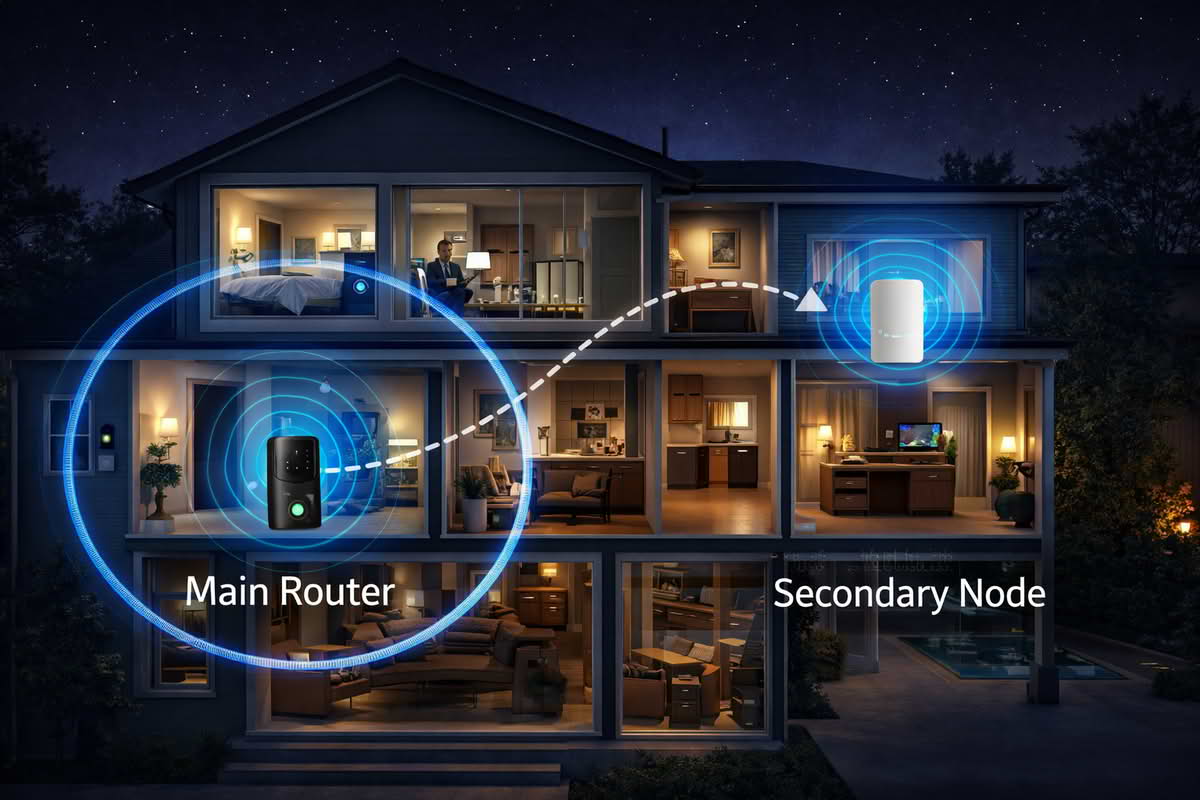
Placement discipline is critical. Mesh nodes need enough separation to extend coverage, but not so much that each node is barely hanging onto the previous one. This is where real floor plan logic matters. Stair landings, open transitions between floors, central hallways, and rooms adjacent to trouble spots are often better locations than outer walls or remote corners where the node itself becomes weak. Buyers sometimes think of the satellite node as something that belongs in the dead zone itself, when in practice it usually works better positioned partway between the main router and the weak area.
Backhaul strategy deserves more attention than many product pages encourage. Wireless backhaul can work well in the right home, especially when nodes have reasonable placement and the house is not excessively dense or awkward. Wired backhaul, when available, tends to create a stronger long-term foundation because each node is not spending as much effort talking to the others over the air. Not every buyer has that option, but the distinction matters because it affects how aggressively you can expect the system to perform in a device-heavy home.
Choose node count based on the actual trouble spots in the home, not just the largest bundle available.
Place nodes between the main router and the weak zone rather than burying them at the edge of the problem.
Think about stairs, hallways, and open transitions as signal bridges across the home.
Favor wired backhaul when the home makes it practical, especially for heavier long-term use.
Large-home mesh systems earn their value when the home is truly hard to cover, not simply because more hardware feels reassuring. In a large house with multiple floors, long distances, and several smart-device clusters, a well-planned multi-node system can create a calmer and more reliable network. But in smaller homes, oversized kits can add unnecessary cost and complexity without solving a real problem. Better placement usually matters more than extra hardware.
Apartment-friendly mesh kits are a different case. In smaller or more open spaces, mesh can still help if the modem location is poor or if dense neighboring networks create interference problems, but the setup should stay restrained. In apartments and condos, the challenge is often not distance alone. It is building material, awkward internet-entry location, and local wireless congestion. That means a smaller mesh kit or a stronger router may both be plausible, and the better answer depends on whether coverage breaks down in several directions or mainly from one inconvenient corner.
Good mesh performance usually depends more on thoughtful node placement and signal path than on simply adding more hardware to the network.
A useful way to think about mesh is as a chain of trustworthy handoffs. Each node should make the next important room feel stronger and more stable without becoming isolated itself. If the nodes are placed like separate islands, the system becomes harder to trust. If they are placed like a logical coverage path through the home, mesh tends to feel much more invisible and reliable in daily use.
The better buying mindset is to design the network around the rooms where people work, stream, call, and rely on smart devices. When placement follows that logic, the right node count often becomes obvious without needing the biggest system in the category.
Judge mesh systems by stability and management quality, not by coverage claims alone
Mesh systems are easy to compare by coverage square footage, peak speed language, and latest-generation Wi-Fi labels, but those numbers rarely tell the whole ownership story. What matters more over time is whether the system stays stable under normal household load, whether the app makes the network understandable, and whether the home’s connected devices can remain calm in the background instead of quietly failing at the edges.
Device load matters because modern homes no longer place equal demands on the network. A mesh system may need to serve laptops on video calls, streaming televisions, gaming devices, phones, tablets, smart speakers, thermostats, doorbells, security cameras, and more. Not all of those require massive bandwidth, but together they create a network that benefits from even distribution and steady device handling. Buyers sometimes chase maximum speed when what they really need is stable multi-device behavior across several rooms.
This is one reason Wi-Fi 6 mesh systems appeal to so many households. They are often less about chasing abstract speed and more about handling a busier device environment with less friction. That does not mean every home needs the newest standard by default, but it does mean buyers should think about how many devices the network is really supporting and how likely that number is to grow. A home with only a few laptops and phones has different needs from one filled with cameras, displays, streaming gear, and work-from-home traffic.
App quality matters just as much. A mesh system is part networking hardware and part management experience. The app should make setup understandable, node status easy to interpret, and routine maintenance reasonably calm. If the system works well but the app makes device grouping, network health, or parental and guest controls feel confusing, the household may still feel like the network is harder to manage than it should be. Good mesh ownership depends partly on whether the software helps you trust what the network is doing.
Prioritize stable multi-device performance over the highest speed claims if the home is heavily connected.
Choose mesh systems with management apps that make node health and basic controls easy to understand.
Use newer Wi-Fi generations when device density and future growth justify them, not just because they sound newer.
Judge the system by how calm the house feels after installation, not by how exciting the specifications look.
Long-term ownership also includes everyday reliability at the edges of the network. A mesh kit should keep porch cameras, garage devices, upstairs workstations, and streaming rooms from feeling like special cases. The strongest sign of a good purchase is usually that the house stops talking about the Wi-Fi. When speakers respond quickly, cameras stay connected, calls remain stable, and devices stop quietly dropping off, the mesh system is doing its job well.
Another quiet issue is upgrade discipline. Buyers sometimes assume mesh gives them a complete networking solution forever. In reality, the best systems create room to grow, but they still need to match the home’s real direction. If the household plans to add more cameras, displays, work devices, or room-level automations, a more robust mesh system may be worth the investment. If the current needs are modest and likely to stay that way, a simpler kit may remain the better value. The point is not to overspend for imagined future needs, but to avoid buying a network that already feels narrow on day one.
The lowest-regret mesh purchase is usually the one that balances node count, app quality, device load handling, and realistic home size without relying too heavily on marketing coverage promises. A calm, stable, easy-to-manage network will usually provide more real value than a more aggressively marketed system that looks strong on paper but feels harder to place or maintain in practice.
The best buying mindset is to evaluate mesh as household infrastructure. Ask whether it will improve the rooms and device clusters that currently struggle, whether the system can be placed sensibly, and whether the management experience is clear enough that the network stays easy to live with long after setup day. Those are the qualities that determine whether mesh becomes a genuinely worthwhile upgrade.
Final Recommendations — choosing mesh that actually improves the home network
The right mesh Wi-Fi system is usually the one that matches the home’s shape, weak-zone pattern, and connected-device load without adding more complexity than necessary. Start by confirming that the home truly has a multi-zone coverage problem, then choose the node count and performance tier that fit the layout and the way the household actually uses the network.
Choose budget mesh systems when the goal is solving several modest coverage problems cleanly without overbuilding the network.
Choose Wi-Fi 6 mesh systems when the home supports many active devices and needs stronger long-term multi-device stability.
Choose large-home mesh systems when layout, floor count, and signal path genuinely require broader multi-node coverage.
Choose apartment-friendly mesh kits only when the layout and modem location justify mesh more clearly than a better single router would.
In the long run, the best mesh system is the one that makes the home feel evenly connected and quietly dependable. It should reduce dead zones, support smart-home reliability, and create a network that fades into the background instead of constantly reminding the household where the weak rooms used to be.