Smart Lock Buying Guide for Practical Everyday Home Entry Control
Smart locks promise a cleaner, more flexible way to manage entry, but they are easy to buy for the wrong reasons. Many people focus first on unlocking methods, app features, or the novelty of using a phone at the front door. The bigger questions usually appear later: whether the lock fits the door properly, whether family members can use it without confusion, whether battery upkeep becomes annoying, and whether the lock still feels dependable when you are tired, carrying groceries, or leaving in a hurry. A good smart lock should reduce small daily friction without making entry feel fragile or overcomplicated. This guide focuses on those practical tradeoffs so you can choose a lock that fits your door, your household habits, and the level of convenience you actually want to maintain over time.
Start with the door, the lock type, and how entry really works in your home
The first smart lock decision is not about apps, biometrics, or voice assistants. It is about the door itself. Buyers often treat smart locks like universal gadgets when they are really pieces of entry hardware that must fit a specific door, a specific lock style, and a specific pattern of daily use. A front door, side entry, apartment unit door, interior garage access door, and rental property door may all raise different questions about compatibility, convenience, and long-term practicality.
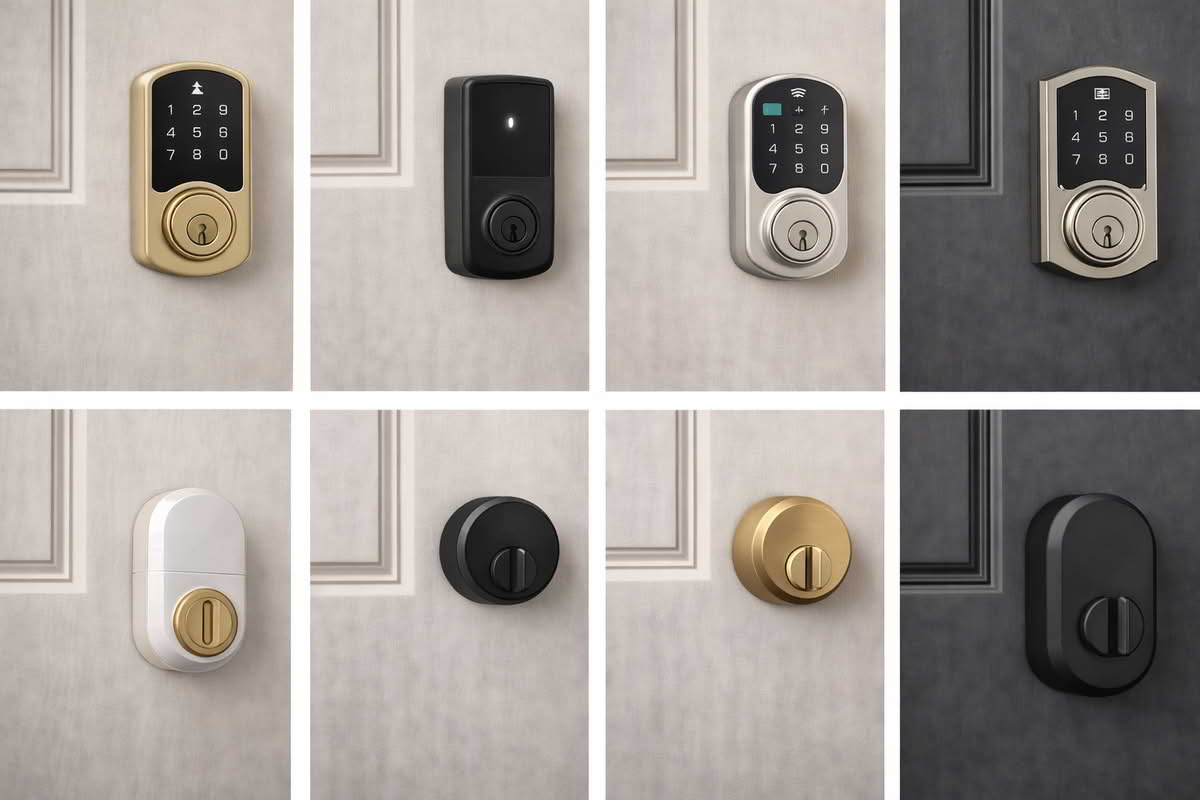
Some smart locks replace the exterior hardware completely. Others retrofit the interior side of an existing deadbolt and leave the outside appearance mostly unchanged. That difference matters more than it may seem at first. Full replacement locks can offer a cleaner all-in-one solution, especially when you want a keypad or a new exterior look. Retrofit designs can make more sense when you want to keep the existing outside hardware, preserve a building-approved appearance, or avoid a more visible change to the door. Neither route is inherently better. The right fit depends on what the door allows and what kind of upgrade you actually want.
Door condition matters too. A lock can only perform well if the door is already aligned reasonably well, the deadbolt moves smoothly, and the existing hardware is not fighting the frame. Smart features do not solve a sticky bolt, sagging door, or poorly aligned strike area. In fact, these problems often become more noticeable after installation because a powered lock has to work against the same mechanical resistance every time it opens or closes. Buyers sometimes blame the smart lock when the deeper issue is that the door itself needed adjustment first.
Confirm whether you want a full deadbolt replacement or a retrofit that keeps existing exterior hardware.
Check that the door closes cleanly and the bolt extends without dragging or forcing.
Think about whether the lock is for the main front door, a side entrance, a garage entry, or a rental setup.
Do not expect smart features to compensate for a poorly fitting or badly aligned door.
It also helps to think clearly about what kind of entry problem you are trying to solve. Some households mainly want to stop carrying keys for short trips, dog walks, or school pickups. Others want easier temporary access for guests, cleaners, dog walkers, or family members. Some want better awareness of whether the door was locked after everyone left. These are all reasonable goals, but they point toward slightly different smart lock priorities. A household focused on temporary access codes may value keypad convenience most. A household focused on preserving existing exterior hardware may prefer a retrofit design. A household that wants the simplest possible low-friction upgrade may not need the most elaborate unlocking system at all.
Apartment and condo buyers should be especially practical here. Building rules, shared-entry contexts, and limits on exterior hardware changes can all shape what is realistic. In those cases, the smartest purchase is often the one that fits the door and the living situation cleanly, not the one with the most ambitious feature list. Likewise, homeowners planning to stay in place for years may care more about durability, consistent daily use, and integration with other entry devices than about a flashy setup experience.
Smart lock success usually starts with door fit and lock type compatibility, not with app features or unlocking novelty.
Another quiet but important issue is traffic pattern. A front door used constantly by several people creates a different ownership experience from a side door used occasionally. Heavy-use doors reward calm dependable operation and simple household logic. Lower-use doors may allow more experimentation. Thinking about frequency of use helps keep the buying decision grounded in real life rather than in what seems impressive during setup.
The best starting mindset is mechanical first, smart second. Make sure the door, bolt action, and lock style make sense before thinking about features. Once the door is a good candidate, the digital side of the decision becomes much easier to judge.
Choose unlocking methods that fit daily habits instead of chasing every feature
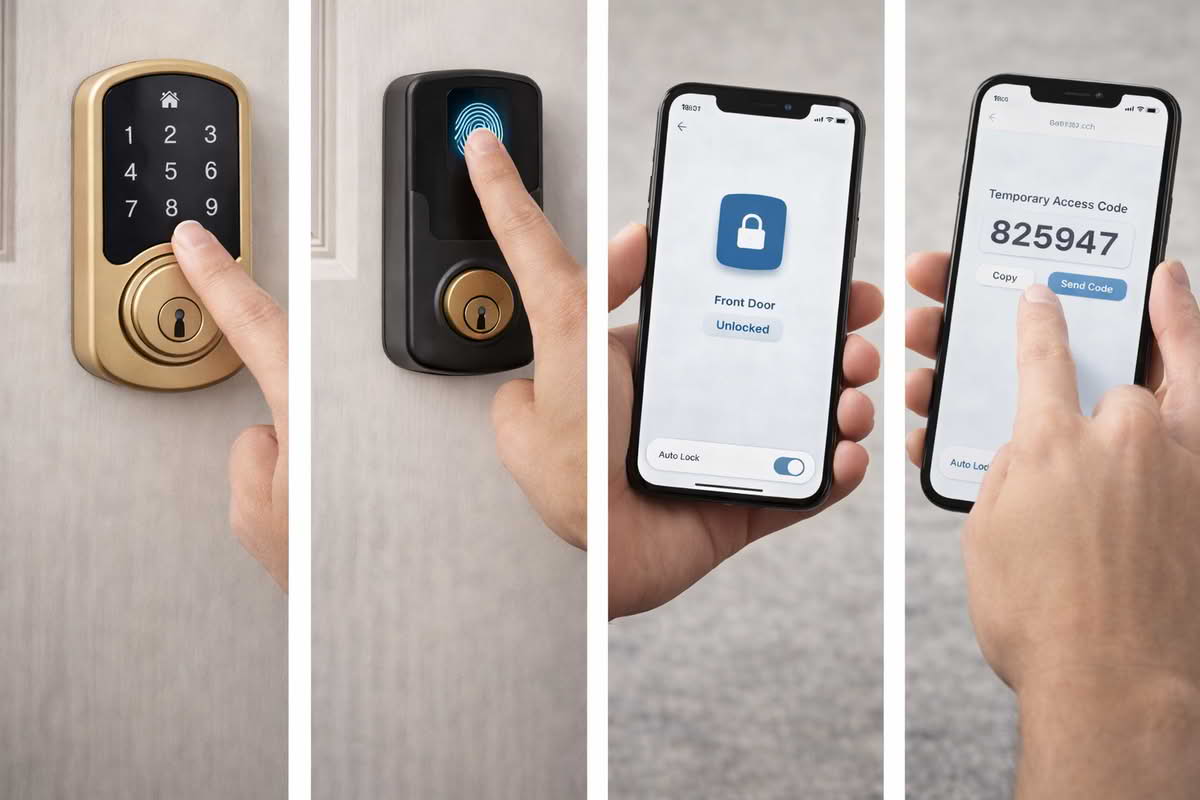
Smart locks are often sold through unlocking methods: keypad entry, phone app control, fingerprint access, auto-unlock behavior, voice assistant integration, and temporary digital codes. These features can all be useful, but buyers often treat them as proof of value by themselves. In practice, the right unlocking method is the one that works smoothly for the people using the door every day. That sounds obvious, yet it is where many purchases go wrong.
Keypads are popular for good reason. They are simple, direct, and easy to explain to other household members or guests. A keypad can remove the need to carry a key for short trips and can be especially useful for children, relatives, house sitters, or service providers who need occasional access. Its strength is that it does not depend on a phone being charged, nearby, or configured correctly. For many homes, that reliability of interaction is more valuable than more advanced-looking features.
Fingerprint access can feel appealing because it promises quick personal entry, especially when your hands are full or you want a more seamless experience. But it should be judged by consistency rather than by novelty. An unlocking method that works beautifully most of the time but becomes unreliable with wet fingers, dusty hands, or rushed daily use may be less valuable than a simple keypad that behaves the same way every time. Convenience features deserve a higher standard at the front door because even small friction becomes noticeable when repeated daily.
Phone-based control is useful in a different way. It shines when you want to check lock status remotely, unlock the door for someone while you are away, or manage access without being physically present. But it is usually better treated as a support layer than as the primary method of entry. Phones run out of battery, household members vary in their tolerance for app-based control, and entry should not depend entirely on everyone having the same technical comfort level. The most durable smart lock setups usually have a primary method that feels natural at the door and a remote method that adds flexibility in the background.
Choose keypad access when you want simple dependable entry for multiple household members or guests.
Choose fingerprint access only if you value speed and are comfortable judging it by consistency, not novelty.
Use app control as a flexible backup and management tool rather than the only way the lock feels “smart.”
Think about the least technical user in the household before choosing a feature-heavy lock.
Temporary codes and shared access controls are another major reason people choose smart locks, and here the practical value can be significant. They can reduce the awkwardness of spare keys, make guest entry more manageable, and help homeowners offer access without handing over a physical copy of the house key. That said, the feature is only as good as the household’s need for it. Some buyers imagine frequent code sharing as a major benefit but rarely use it. Others find that even occasional temporary access makes the smart lock feel worthwhile. The key is to understand whether this is a central use case or a nice extra.
Auto-lock and auto-unlock functions also deserve realism. Auto-lock can be helpful for people who frequently wonder whether the door was left unlocked, but it should be configured with care so it does not feel abrupt or inconvenient. Auto-unlock can sound elegant, yet some households find it less predictable or less reassuring than a more deliberate unlocking method. Entry control works best when it feels understandable. Features that act at the wrong moment or feel hard to interpret can reduce trust rather than increase convenience.
The most useful smart lock features are usually the ones that fit everyday household routines, not the ones that look most advanced on the product page.
Family use should stay central throughout this decision. A lock may feel perfect to the person who researched it, installed it, and enjoys adjusting settings, but that is not enough. The front door is a shared part of the home. Children, spouses, guests, relatives, and occasional visitors all encounter it differently. A lock that requires too much explanation or too much trust in one narrow unlocking method can become a source of low-grade household friction.
The strongest feature mix is usually modest: one clear on-door method that works reliably, one remote or backup method that adds flexibility, and household settings that are easy to explain. Smart locks work best when they reduce mental load around the door instead of increasing it.
Judge smart locks by reliability, backup access, and long-term upkeep
Smart locks are different from many other smart-home purchases because failure feels immediate. If a speaker routine misbehaves, it is annoying. If a front-door lock becomes unreliable, the whole value proposition is questioned at once. That is why reliability should outweigh feature abundance. The most impressive app, the most polished biometric entry, or the cleanest code-sharing system does not matter much if the lock feels uncertain at the moment you actually need to enter the house.
Battery upkeep is a central part of that reality. Many smart locks run well for long stretches, but they still rely on regular attention to battery condition. Buyers should not think of this as a flaw so much as a maintenance fact. The real question is whether the lock communicates battery status clearly, gives enough warning, and offers sensible fallback behavior before inconvenience becomes a problem. The less visible the battery routine feels in normal life, the better the ownership experience tends to be.
Backup entry deserves equal weight. A good smart lock setup should not leave the household feeling trapped by one method of access. Physical key backup, external emergency power support, or another dependable fallback can matter a great deal, especially on a main entry door. Many buyers focus heavily on the convenience of going keyless, only to realize later that psychological comfort still matters. Even if you rarely use the backup, knowing there is a calm, obvious recovery path can make the whole system feel more trustworthy.
Prioritize consistent locking and unlocking behavior over advanced features that add little daily value.
Check how the lock handles battery warnings, low-power behavior, and fallback access.
Make sure the household understands the backup entry plan before relying on the lock fully.
Remember that a front-door device must feel dependable under stress, not just during setup.
Long-term ownership also includes software quality, notification restraint, and integration discipline. A smart lock should not feel noisy. Status updates, lock history, and access management can all be useful, but too many alerts or an overly complicated app can make the lock feel more like a monitoring project than an entry tool. This is one place where restraint matters. Entry technology should simplify access and awareness, not create another stream of minor decisions.
Physical durability matters as well because locks live in a demanding part of the home. Exterior exposure, frequent handling, temperature shifts, and repeated mechanical cycling all shape whether the lock continues to feel solid over time. A lock used several times a day needs a different level of confidence than a specialty device used occasionally. The more central the door is to household life, the more valuable it is to choose a lock that feels calm, sturdy, and mechanically settled rather than merely feature-rich.
There is also a subtle social aspect to smart lock ownership. People tend to forgive a little friction in occasional-use tech, but not at the front door. A lock that occasionally delays, requires repeated attempts, or behaves inconsistently can become mentally exhausting because entry is one of the home’s most repeated daily actions. This is why the best smart lock is often not the one that does the most. It is the one that makes the door feel smoother and more manageable every single day.
The safest buying mindset is to judge the lock as household infrastructure. Ask whether it will still feel sensible after the setup excitement passes, whether another adult in the house can use it without coaching, whether the battery routine is reasonable, and whether the backup plan feels real rather than theoretical. Those questions usually matter more than any single feature headline.
Final Recommendations — choosing a smart lock that makes entry easier without adding fragility
The right smart lock is usually the one that fits the door well, gives the household one clear everyday entry method, and stays dependable with minimal maintenance. Start by confirming mechanical fit and lock type, then choose the unlocking approach that matches how people actually come and go rather than the one that sounds most advanced.
Choose keypad-focused smart locks when you want low-friction shared entry and simple guest access.
Choose retrofit smart locks when preserving the existing exterior hardware or building appearance matters.
Choose feature-rich locks such as fingerprint or broader app access only when those features clearly support daily use.
Prioritize reliability, battery management, and backup access above novelty features that add complexity at the front door.
In the long run, the lowest-regret smart lock is the one that feels boring in the best possible way. It fits the door, works the way the household expects, and quietly reduces key-related friction without making the front entry feel like another device that constantly needs attention.